• Link to Instagram
  • Link to LinkedIn
  • Link to Youtube
  • Log In
  • Book A Demo
Coplan / KIT
  • Home
  • Products
      • KIT
      • kiticonExplore KIT – Simplify your tool control with KIT’s no-nonsense, intelligent tool management system.
      • coshhCOSHH & Safety – Stay on top of your COSHH items with real-time information, ensuring you are always in the know.
      • auditsTool Audits – Say goodbye to time-consuming manual audits with visual tool audits that take seconds.
      • Clear Title
      • calibrationTool Calibration – Streamlined, effortless tool calibration management and centralised record management.
      • inventoryTool Inventory Management – Complete record management of your tool inventory in one central system for audit bliss.
      • standardisationTool Standardisation – Your gateway to enhanced productivity and tool familiarisation whilst preventing tool creep.
      • Other Products & Services
      • protection-foamProtection Foams – Specialist foam pads designed to protect valuable aerospace assets during manufacture and servicing.
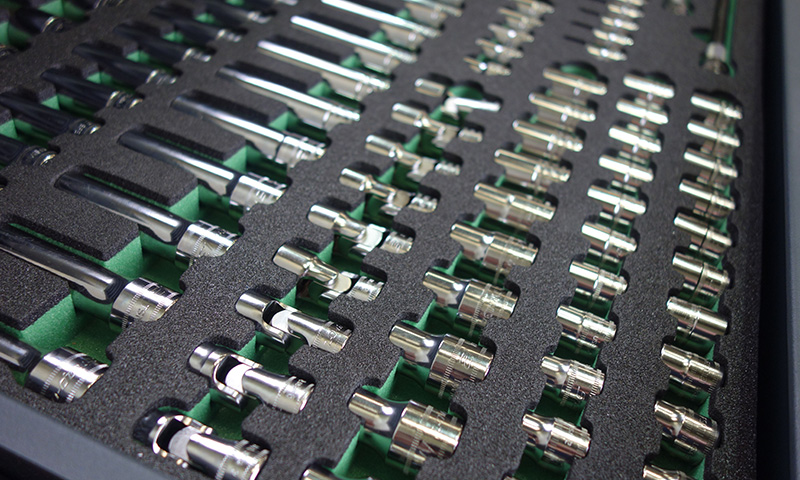
      • inlaysFoam Inlays (Drawers & Cases) – Custom designed foam inlays for bringing order to tool cabinets, workshop drawers and tool cases.
      • shadow-boardShadow Boards (Foam & Vinyl) – Foam or vinyl shadow boards for organising and storing tools and large equipment.
      • trainingProfessional Services & Training – Maximise the benefit your teams gain from your KIT investment with on-site, online or classroom training options.
  • Industries
      • aerospoaceAerospace – KIT heightens tool visibility, automates audit and calibration processes to ensure you’re always ready for AS9100, NADCAP or internal audits and never caught off guard.
      • automotiveAutomotive – KIT drives compliance with IATF 16949, ISO 9001, and OEM-specific standards, providing total tool visibility with effortless compliance.
      • defenceDefence – KIT eliminates visibility gaps and automates tool control processes to meet MAA, DEF STAN, ISO and internal inspection standards and keep you audit-ready without disruption.
      • food-drinkFood & Drink – KIT is the key ingredient to tool traceability, calibration and zonal control, minimising production disruption and simplifying BRCGS, HACCP, ISO22000 and retailer audit compliance.
  • Case Studies
  • News & Events
        • blogBlog – Our latest articles, guidance, and thought pieces about the impact of intelligent tool control in modern manufacturing, including 5S, Smart Manufacturing, AI and others.
        • case-studiesCase Studies – Stay up to date with stories from KIT and Coplan customers about their experience and the impact of our solutions on their businesses.
        • eventsEvents – Here’s our calendar of planned industry and company events where you can find us throughout the year.
        • newsNews – Catch up with the latest announcements, stories, milestones and updates shaping our company.
  • About Us
      • careersCareers – What you can expect from us, the opportunities we have open and our values around career growth, learning and development.
      • historyHistory – Learn about our past, present and future, where we have come from, how we have evolved and where we see ourselves going in the future.
      • standards-and-ethicsOur Standards & Approach – Compliance and quality is where it counts for our customers and so it is for us. So here’s our commitments and values.
      • partnersPartners & Memberships – Working in industry is about being part of a larger community and working together. We believe we have some of the best partnerships in the business.
  • Contact Us
  • Menu Menu

Transforming Tool Management At UTAC With KIT

May 1, 2026/in Automotive, Case Study, Defence, ExploreKit, Tool Audits, Tool Calibration, Tool Inventory Management/by coplan

3D illustration. Clay car inside wind tunnel. Design without real car reference and without copyright. Concept sports car, industry of transportation.

Client Overview

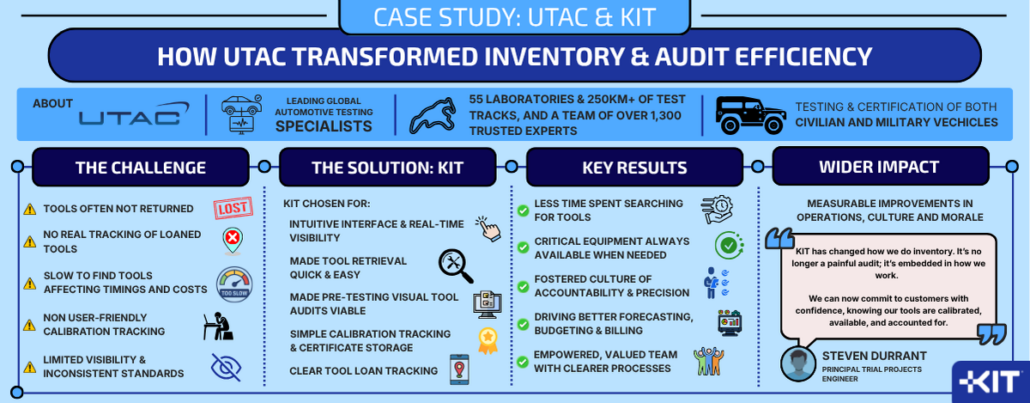
Since 1924, UTAC has led the mobility industry, driving progress toward a safer, cleaner future and offering a wide range of services to support bringing vehicles to market.

With a footprint of 55 laboratories and 250km of test tracks across the globe, and a team of over 1,300 trusted experts, UTAC are one of the world’s leading independent experts in automotive testing and engineering. They offer a vast array of tailor-made services for the testing and certification of civilian and military vehicle alike. UTAC operates in a high-pressure environment where precision, speed, and reliability are non-negotiable.

Their work determines whether vehicles are fit for operational duty or use on our roads, so their tools must be flawless.

Challenge

Like many engineering teams, prior to adopting KIT, they faced familiar but costly operational challenges:

  • Tools were not always returned to their designated locations or were out on loan but not consistently tracked.
  • Engineers often took time to locate equipment, potentially affecting project timelines and costs.
  • Calibration tracking was not systematic or user-friendly, so was hard to maintain.
  • Limited visibility and inconsistent standards made cross-departmental collaboration more difficult.

Solution

KIT was introduced as a unified platform for tool and equipment management. Its intuitive user interface allowed engineers to:

  • Locate and grab tools quickly and efficiently.
  • Visually audit tool inventory prior to vehicle testing.
  • Scan tools, check calibration status, certificates and instructions.
  • Track loans and returns across departments.
  • Maintain real-time visibility of inventory status and calibration schedules.

Results

Since adopting KIT, the team has seen measurable improvements across operations, culture, and morale:

  • Operational Efficiency: Engineers now spend less time searching for tools and more time executing tests.
  • Business Continuity: Critical equipment is always available when needed, reducing downtime and ensuring delivery commitments.
  • Cultural Shift: KIT has become embedded in daily workflows, fostering a culture of accountability and precision.
  • Data-Driven Decisions: Real-time insights enable better forecasting, budgeting, and client billing.
  • Morale Boost: Technicians feel empowered and valued, with fewer frustrations and clearer processes.

Customer Quote

“KIT has changed how we do inventory. It’s no longer a painful audit; it’s embedded in how we work. We can now commit to customers with absolute confidence, knowing our tools are calibrated, available, and accounted for.”

Steven Durrant, Principal Trials Project Engineer
UTAC 

Download the full case study PDF
https://thisiskit.com/wp-content/uploads/2026/04/crash-test-2.jpg 576 1024 coplan https://thisiskit.com/wp-content/uploads/2026/02/kit-logo.png coplan2026-05-01 01:37:452026-05-01 08:28:57Transforming Tool Management At UTAC With KIT

Product Update – January 2026

January 26, 2026/in ExploreKit, News, Tool Audits, Tool Inventory Management/by coplan

A major new release for KIT sees huge strides in the versatility of the Audit functionality

The start of 2026 sees a major release for KIT and features a significant update to the Audit functionality. Offering increased flexibility and alternative methods by which you can conduct Audits, and the ability to pause Audits, the new Audit functionality heightens the ability to tailor the solution to your ways of working and work even smarter, rather than harder.

We’re thrilled to introduce these enhancements, which complement rather than replace the existing functionality. They have been designed in collaboration with some of our customers to meet their changing needs as they scale, with clear benefits to the overall workflow and user experience.

Improved Audit Process

We have redesigned the workflow of Audit process, implementing a streamlined, step by step wizard approach. Instead of being asked “Are any spaces at the location empty?” when performing an Audit, we now offer clearer guidance and prompt the User to select all the Items that are missing in the selected Location. Once selected, the wizard restates the Items selected by the User as missing and asks them to confirm to complete the Audit.

Audit By Presence

We have introduced the option for any Audit Policy to be set to either ”audit by presence” or “audit by absence”. The new “audit by presence” capability is a toggle switch that is defined when creating or editing an Audit Policy. The default setting for existing Audit Policies and all new Audit Policies remains “audit by absence”, which is where the user is asked to select all Items that are missing within the Location that is the subject of the Audit.

The “audit by presence” option enables locations to be audited based on what Items are present at the Location rather than what is missing. This is the opposite of the default method but is particularly useful for non-visual locations such as COSHH cupboards or other locations storing various Items such as large power tools, jigs and fixtures. For non-visual Locations, we have also introduced the ability to use cameras or scanners on Item QR or barcode labels to prove their presence. More on that later in these notes.

Audit Pausing

We have created the ability for Audits at a Location to be paused until a defined date in the future, but only by Users with the Pause permission. This feature prevents the Location from being incorrectly included in the Overdue Audit reports whilst the Pause is in place.

Once the Pause has expired, it automatically returns to its normal Audit schedule as determined by the Audit Policy and will be appear in the Overdue Audit report until it is next audited. The concept here is that customers may not want to include some Locations in Audits or reports whilst the Owners of those Locations are on holiday, off sick or seconded elsewhere or if the Location is temporarily out of use.

However, a User with the Pause permission may also manually override the Pause and “Resume Audits” at the Location, so that if they return to work earlier than expected or the Location is reinstated to use earlier, they can ensure the Location audit schedule is restarted.

Permitted Audit Days

Within the definition of an Audit Policy, it is now possible to nominate the days of the week on which Audits would normally occur (“Permitted audit days”) and therefore make it more accurate to determine when Audits become overdue. For example, a location can be marked so that audits only ever become due Monday-Friday. This can help prevent audits becoming overdue when there is no way for the location to be audited on that day.

With this new functionality. the Location will not appear in the Overdue Audits report until the day after which its next Audit falls due. This will make the reporting of Overdue Audits more accurately reflect the normal audit frequency practices of the organisation and eliminate over-counting. It will also reduce the volume of unnecessary notification emails related to Overdue Audits.

Marking Missing Items as Found

Up to now, when an Item is identified and recorded as missing during an Audit and is then subsequently found, the only way to recognise that it is now present at the Location has been to perform a new Audit.

Now, Users can navigate to the Item details and select “Mark as found”. This will record who marked the Item as found with a date/time stamp. This information is available in the Audit History. When an Item is marked as found, the Item is removed from the Missing Items report and will no longer be included in the numbers of Missing Items shown on the Dashboard or included in email notifications.

Expected Missing Items

We have changed the behaviour of KIT regarding Items that are known or expected to be missing. The system will now take into account Loans, Location statuses, and vacant Item pockets in Locations when an audit is performed. Vacant Item pockets no longer need to be selected when reporting missing Items on a visual Location.

If an Item is known to be on an active loan or is known to have a non-default Location status, the system will let the User know that the Item is expected to be missing. These Items will not be shown in the Missing Items report or included in the numbers displayed on the Dashboard. The reason for the absence is maintained in the Audit History.

Audits on Location Groups

Visual audits can now be initiated at Location Group level. This launches a wizard that guides the auditor through all the Audits required for that Location Group in a single session, reducing the number of steps required when compared to the current process of having to perform each Location audit separately. This makes it faster and more efficient to check multiple related locations, such as a cabinet with several drawers.

In this example, if wanting to conduct a complete Audit of a seven-drawer tool cabinet, previously you would have to navigate to each Location individually and then complete the Audit process for each of the seven drawers / Locations. With the new wizard approach, the system does this automatically and prompts you through each Audit. Within the Audit Policy definition, administrators can specify whether it is to be “excluded from group audits”. If this is enabled, any Locations assigned to that policy will be skipped during Location Group Audits.

Reporting of Location Issues

As part of performing a visual Audit, it is now possible to report any issues with the Location itself (e.g. spills/leaks, safety concerns, broken lock, etc). This feature enables the auditor to provide a description of the issues they have seen and attach photos or PDF documents to provide other context as necessary. This new feature is enabled within the Audit Policy definition. Any audits performed on Locations that are subject to an Audit Policy with this enabled is then prompted as part of the Audit wizard to detail any such issues.

In addition, Users who have the new “Audit location issues” email notification enabled within their User record will be sent email notifications whenever a Location issue is recorded. This can be set to notify Users for all Locations or only Locations they own.

Recording remedial actions on Item issues

Now, whenever a User clears an issue on an Item, they are prompted to add notes to detail any remedial action taken to resolve the issue. This gives transparency of any fixes and gives a more complete life history of the Item, such that common issues can be easily spotted over time.

Using cameras & scanners for Audits

When performing an “audit by presence”, a new “Scan items” option is available within the Audit wizard that allows a camera or handheld scanner to be used to scan KIT item tags, QR code labels or barcodes on Items to mark them as present.

The scanner screen provides both visual and audio cues as Items are scanned. This provides a rapid way of verifying the presence of Items in Locations that do not have visual tool control and saves time having to visually search for, find and match each Item to its description in the Item list for that Location.

What’s New

From now on, the first time a user logs in after an update to KIT, they will be greeted by a “What’s New” splash screen that will display the Release Notes for the new release that details the changes to the software that have been implemented since their last login.

This screen will only appear on first login for the user following the update. After that, the Release Notes may still be accessed either on the website or in the new Release Notes archive.

Release Notes archive

We have also implemented an archive of Release Notes that will be available to users via the new Release Notes page. This will contain the Release Notes for up to the 10 most recent releases, so that customers can see a history of when changes were implemented or if they wish to re-read the release notes for the latest release.

Font changes

We have also made subtle tweaks to the default font choices used in the software. We now use “Exo 2” as our font for page, dashboard and report headings and titles, and “Inter” as our default font choice for body content, as featured for data fields and report rows.

Both are free to download Google fonts that render quicker and cleaner, with greater character separation, making them much easier to read on the screen.

We’re always evolving KIT to make managing tools and equipment smarter, simpler, and more insightful.

https://thisiskit.com/wp-content/uploads/2025/10/product-update-fe.jpg 947 1420 coplan https://thisiskit.com/wp-content/uploads/2026/02/kit-logo.png coplan2026-01-26 10:27:342026-04-28 08:30:10Product Update – January 2026

Product Update – December 2025

January 5, 2026/in News, Tool Inventory Management/by coplan

Although a relatively minor release, we have recently deployed a number of small enhancements designed to improve the overall user experience and provide a more personalised, tailored view for the user.

Customer branded calibration certificates

Customer logos can now be used on calibration certificates, in place of the standard KIT logo heading. To request this change, please contact us so we can advise you on logo image size, resolution and format requirements.

My Items filter change

The “My Items” filter that applies to the dashboard and all reports now only shows loans that contain items you own.

Multi-Line Comment visibility

We have improved the display of multi-line comments on “Areas of Use” and “Calibrations”, so that longer comments can be more readily viewed by the user.

Tool Calibration date visibility

When viewing a particular location and accessing the Location Items Excel export, the report now includes a column for “Last Calibration” and “Next Calibration Date”.

Minor fixes

When changing filters, some users had reported an issue with the cursor jumping. This has now been fixed.

Previously, if a serial number was entered on a location with any whitespace in the text, it could cause an error, but this is now working correctly.

We’re always evolving KIT to make managing tools and equipment smarter, simpler, and more insightful.
https://thisiskit.com/wp-content/uploads/2025/10/product-update-fe.jpg 947 1420 coplan https://thisiskit.com/wp-content/uploads/2026/02/kit-logo.png coplan2026-01-05 10:28:212026-04-28 08:30:35Product Update – December 2025

Product Update – October 2025

October 15, 2025/in News, Tool Audits, Tool Inventory Management/by coplan

We’ve recently rolled out a series of powerful enhancements to help teams gain deeper insight into tool usage, reliability, and availability; all designed to support better decision-making and operational continuity.

New Audit History at Location

A new Audit History dialog has been added to the view location screen that allows the user to view the audit history for the location. This is particularly useful if users want to understand how long a tool has been missing from a given location or understand any trends in its use or availability. If a tool is regularly missing from a specific location, it could indicate that either the area is not following prescribed tool procedures about returning tools after use, or that it is in high demand for which a spare or second tool may want to be considered to enable business continuity.

Enhanced Item Audit History

The audit history at the item level has been changed to show both the history for the item, and for the item position (for visual locations). This additional visibility enables users to understand more about patterns of use and whether tooling is sufficient to meet project demand.

Revised Loan History

The Loan History dialog has been overhauled to better reflect the history of the item. It now shows when the item was added to different loans and when it was returned, rather than focussing on the overall status of the loan. This provides a more granular visibility about item movements and helps with future planning for tool procurement and project loading.

New Item Condition History

A new Item Condition History dialog has been added to the view item page. This allows a history of all the issues reported on an item to be viewed (and when the issues were cleared). This gives visibility of the resilience and reliability of individual tools and inform future decisions over vendor, brand and tool selection.

Inventory Location editing flexibility

Users can now change or remove serial numbers from inventory locations should inlays be switched out or no longer be required. Nominated owners of locations can also now be changed and unassigned. This flexibility enables the system to reflect changes of use, people, roles and responsibilities within organisations and allow greater mobility of toolsets across locations.

Loan Item safeguards and workflow enhancements

Changes to loans to prevent accidental deletions and streamline item transitions from one loan to another without having to close the original loan.

We’ve also added some handy improvements like new calibration units and smoother admin navigation, plus a bunch of small behind-the-scenes updates to keep things running fast, stable, and secure.

We’re always evolving KIT to make managing tools and equipment smarter, simpler, and more insightful.

https://thisiskit.com/wp-content/uploads/2025/10/product-update-fe.jpg 947 1420 coplan https://thisiskit.com/wp-content/uploads/2026/02/kit-logo.png coplan2025-10-15 10:26:402026-04-30 16:45:22Product Update – October 2025

Enhancing Efficiency and Savings

January 19, 2024/in Blog, Tool Inventory Management/by coplan

The KIT Advantage in Workplace Inventory Management

In the ever-evolving landscape of modern workplaces, efficiency and resource optimisation are critical components of success. One often overlooked but pivotal aspect is the management of tools and equipment. Enter KIT – the cloud-based inventory management solution that is revolutionising the way organisations keep track of their assets.

Streamlining Operations with KIT

Keeping Inventory in the Cloud (KIT) represents a paradigm shift in inventory management. Traditional methods relying on manual data entry and paperwork are prone to errors and time-consuming processes. KIT changes the game by offering a cloud-based solution accessible from anywhere. No more sifting through spreadsheets or rifling through paperwork – just seamless, real-time data at your fingertips.

Anytime, Anywhere Access

One of the standout features of KIT is its flexibility. With desktop login capabilities, employees can access the inventory system from the convenience of their computers. However, what truly sets KIT apart is its QR code functionality. Placing QR codes at tool or equipment locations allows for on-the-spot updates. Imagine a scenario where a simple scan provides instant access to an item’s status – whether it’s in use, available, or undergoing maintenance. This level of accessibility is a game-changer, fostering a more agile and responsive workplace.

Efficiency Redefined with QR Codes

The integration of QR codes into the inventory management process is a stroke of genius. Each tool or piece of equipment is assigned a unique QR code, turning the cumbersome task of inventory tracking into a breeze. Scanning the code updates the cloud-based system in real-time, eliminating the need for manual data entry and reducing the risk of human error. This not only saves time but also enhances accuracy, ensuring that your inventory records are always up-to-date.

Cost-Efficiency as a Core Benefit

Beyond the immediate benefits of time savings and accuracy, KIT translates into significant cost-efficiency. The real-time data provided by the cloud-based system allows organisations to make informed decisions about resource allocation. No more overstocking or understocking – just a well-optimised inventory that minimises unnecessary expenses and maximises the utility of tools and equipment.

Security at the Forefront

Concerns about the security of cloud-based systems are valid but unwarranted with KIT. Rigorous security measures, including encryption protocols and secure login processes, ensure that your inventory data remains protected. Regular updates further fortify the system against potential vulnerabilities, allowing you to reap the benefits of a cloud-based solution without compromising on security.

In conclusion

The adoption of a KIT-powered cloud-based inventory management system is a strategic move towards increased efficiency and substantial cost savings. The combination of anytime, anywhere access, QR code integration, and robust security measures positions KIT as an invaluable asset for organisations seeking to thrive in a dynamic and competitive business environment. Embrace the future of inventory management – embrace KIT.

https://thisiskit.com/wp-content/uploads/2026/04/inventory.jpg 480 800 coplan https://thisiskit.com/wp-content/uploads/2026/02/kit-logo.png coplan2024-01-19 15:30:072026-04-29 16:54:34Enhancing Efficiency and Savings

Delivering a customer visual tool control storage solution for The University of Exeter and Drake Tooling

March 1, 2023/in Case Study, Foam Inlays, Tool Inventory Management/by coplan

Our Client

Established in 1976, Drake Tooling & Abrasives Ltd supply the precision engineering market with abrasives and cutting tools, and a complete technical back-up. Today the business is one of the South West’s leading Engineering Distributors, offering a wide range of products and services including the very best in abrasives, cutting tools and measuring equipment.

The Project Drake

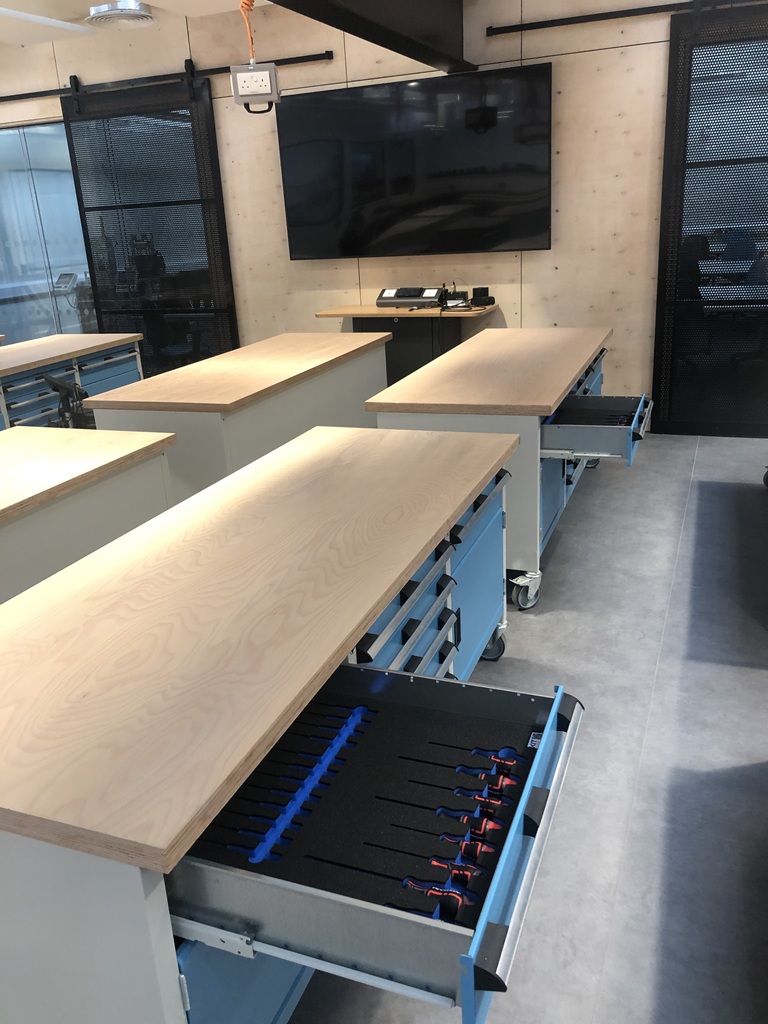
were delivering a project for University of Exeter, providing the furniture, tooling and equipment for an innovative new space which would enable students to prototype their engineering ideas. This would be a world-class facility, providing students with an opportunity to test and develop their manufacturing and engineering skills.

The space has been designed with 30 tool benches and a maximum capacity of 60 students. This meant that up to 500 students a week could be using the space, and the 1,500 tools that were included in the specification of the new space.

The Challenge

At an earlier design stage, it was intended to store tools on the wall spaces using traditional tool shadow boards, but with 1,500 tools there wasn’t sufficient wall space. An alternative visual control solution was needed which meant that the tools would be stored in drawers instead. Although the team at Drake Tooling had previous experience subcontracting this sort of work, they hadn’t been impressed with the result and were concerned that they would struggle to find a suitable supplier for this high-profile project. When we were recommended by their furniture supplier, they were keen to get in touch to discuss the challenge.

The Solution

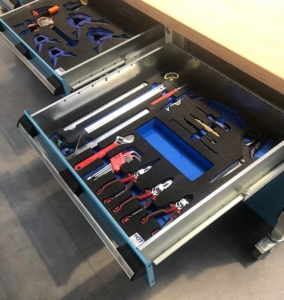
We worked alongside Drake Tooling to develop and supply a custom visual tool control solution, using a design approach which would ensure it was easy to identify any missing equipment. Using a single collection of tools supplied by the client, we digitised each individual tooling profile and created design layouts for the University to review. These designs were reviewed and refined, before we then produced a set of samples for testing. These were designed with a blue foam base and a black foam upper layer – the two contrasting colours making it easy to identify missing tools. Once the final designs were approved, we produced the 120 custom foam inserts that would be needed to store all the individual hand tools. It took four weeks from initial design to completion of the project – a delivery timeline that impressed all of the project stakeholders.

The Result

Both the University and Drake Tooling were very impressed with our proactive approach, which allowed us to deliver a full solution quickly and effectively. In addition to providing the foam storage, we also included our KIT inventory software solution, providing added value and unlocking potential for a smarter inventory solution Both our client and the University are now keen to work with us on new projects, including the opportunity to digitally publish information about tools, instructions, and risk assessment documentation through our KIT platform to any web-enabled device used by the staff or students.

Download the full case study PDF
https://thisiskit.com/wp-content/uploads/2026/04/work-bench.jpg 1280 1920 coplan https://thisiskit.com/wp-content/uploads/2026/02/kit-logo.png coplan2023-03-01 14:49:262026-05-01 10:14:09Delivering a customer visual tool control storage solution for The University of Exeter and Drake Tooling

Best Practice Tips: effective tool control

January 6, 2022/in Blog, Professional Services & Training, Tool Inventory Management/by coplan

If you are looking for effective tool control tips, you have come to the right place.

Tool control is essential in business. If you are not effectively controlling your tools, this could be dangerous for anyone involved. It is a part of business that must be taken seriously at all times, and that’s why we have written this article. Down below, we’re going to be looking at some of the best practice tips when it comes to effective tool control, so keep reading to find out more.

Tool Identification Measures

Marking tools is the most common method of identifying them. Traditionally, the person would mark their tools with their name, their initial, or another identifying mark that allows them to be sure that the tool belongs to them. If someone knows that their tool can be traced back to them, they are more likely to report it missing in the first place rather than buying a replacement and hoping nobody notices. It also ensures that the owner will get their tool back a lot faster as the marking will stand out. This will change the behaviour of your team completely.

Good Policies Complimenting Your Tool Control

This means that you should be taking measures to ensure that the practice of your business backs up your tool control. For example, the tools that are needed for a specific job should all be together in a toolkit. This should be done so that there are multiple toolkits for each maintenance job, ensuring that tools are in the right places. Before a job is signed off in the maintenance log, a tool control inspection should be completed. This should include checking that all the tools are there, that none of them are broken and so on. Don’t forget that broken tools can be just as problematic as missing tools, which is why all tools need to be inspected before and after use.

Tool Control Training In Induction Programs

All new starters to your business should be trained in tool control. As such, your induction programs should now include this in them to ensure that everyone understands what is expected of them when they start working for your company. Everyone needs to understand the standard operating procedures and the role that tool control plays in them. If they don’t, this is where things start to go wrong. If you offer training, nobody has the opportunity to turn around down the line and say they didn’t have the correct information to effectively manage tool control.

Remind Your Staff of Their Responsibilities

Finally, you should make sure that you are reminding your staff of their responsibilities when it comes to tool control. There are a few ways that you can do this, with the first being sending them on refresher courses every now and then. You should also think about hanging up posters in the workplace as a gentle reminder.

We hope that you have found this article helpful, and now see some of the best practice tips that you should be using when it comes to effective tool control. If you put these practices into place, then there should be no reason for tools to go missing anymore! We wish you the best of luck, and hope that you see results sooner rather than later!

Make sure that you are reminding your staff of their responsibilities when it comes to tool control.

https://thisiskit.com/wp-content/uploads/2026/04/socket-case.jpg 480 800 coplan https://thisiskit.com/wp-content/uploads/2026/02/kit-logo.png coplan2022-01-06 15:43:132026-04-30 16:47:12Best Practice Tips: effective tool control

Pages

  • Aerospace
  • Aerospace
  • Automotive
  • Blog
  • Careers
  • Case Studies
  • Contact Us
  • Coplancontrol
  • COSHH & Safety
  • Defence
  • Events
  • Explore Kit
  • Foam Inlays (Drawers & Cases)
  • Food & Drink
  • History
  • News
  • Our Standards & Approach
  • Partners & Memberships
  • Professional Services
  • Protection Foams
  • Resources
  • Sample Page
  • Shadow Boards (Foam & Vinyl)
  • Tool Audits
  • Tool Calibration
  • Tool Inventory Management
  • Tool Standardisation
  • Training
  • Welcome
  • Welcome 2

Categories

  • Aerospace
  • Automotive
  • Blog
  • Case Study
  • COSHH & Safety
  • Defence
  • Event
  • ExploreKit
  • Foam Inlays
  • News
  • Professional Services & Training
  • Shadow Boards
  • Tool Audits
  • Tool Calibration
  • Tool Inventory Management
  • Tool Standardisation

Archive

  • May 2026
  • April 2026
  • March 2026
  • January 2026
  • December 2025
  • November 2025
  • October 2025
  • September 2025
  • March 2025
  • February 2025
  • May 2024
  • February 2024
  • January 2024
  • November 2023
  • July 2023
  • May 2023
  • April 2023
  • March 2023
  • July 2022
  • January 2022
  • July 2021
  • May 2021

Take Your Next Step

Click a button below to move one step closer to realising how KIT can simplify your tool management

Read more about KIT Watch Demo Request Info Schedule a Call

KIT® is a registered trademark of Coplan Ltd

Location Location Coplan Ltd, 28 Vincent Avenue, Crownhill, Milton Keynes, MK8 0AB

Phone Phone +44 (0)1908 307956

Mail Mail info@coplancontrol.com

General

Home
Careers
History
Our Standards & Approach
Partners & Memberships
Resources

News & Views

Blog
Case Studies
Events
News

Products

ExploreKIT
COSHH & Safety
Tool Audits
Tool Calibration
Tool Inventory Management
Tool Standardisation
Professional Services & Training
Explore COPLAN Foams
Protection Foams
Foam Inlays
Shadow Boards

Industries

Aerospace
Automotive
Defence
Food & Drink

Contact Us

General
Book a Discovery Call

KIT® is a registered trademark of Coplan Ltd

Location Location Coplan Ltd, 28 Vincent Avenue, Crownhill, Milton Keynes, MK8 0AB

Phone Phone +44 (0)1908 307956

Mail Mail info@coplancontrol.com

General

Home
Careers
History
Our Standards & Approach
Partners & Memberships
Resources

News & Views

Blog
Case Studies
Events
News

Products

ExploreKIT
COSHH & Safety
Tool Audits
Tool Calibration
Tool Inventory Management
Tool Standardisation
Professional Services & Training
Explore COPLAN Foams
Protection Foams
Foam Inlays
Shadow Boards

Industries

Aerospace
Automotive
Defence
Food & Drink

Contact Us

General
Book a Discovery Call

©2026 KIT is a trading style of Coplan Limited
  • Link to Instagram
  • Link to LinkedIn
  • Link to Youtube
  • T&Cs
  • Privacy Policy
  • Terms of Use
  • Terms of Access
Scroll to top Scroll to top Scroll to top
  • Home
  • Products
    • KIT
    • Explore KIT
    • COSHH & Safety
    • Tool Audits
    • Clear Title
    • Tool Calibration
    • Tool Inventory Management
    • Tool Standardisation
    • Other Products & Services
    • Protection Foams
    • Foam Inlays (Drawers & Cases)
    • Shadow Boards (Foam & Vinyl)
    • Professional Services & Training
  • Industries
    • Aerospace
    • Automotive
    • Defence
    • Food & Drink
  • Case Studies
  • News & Events
    • Blog
    • Case Studies
    • Events
    • News
  • About Us
    • Careers
    • History
    • Our Standards & Approach
    • Partners & Memberships
  • Contact Us