• Link to Instagram
  • Link to LinkedIn
  • Link to Youtube
  • Log In
  • Book A Demo
Coplan / KIT
  • Home
  • Products
      • KIT
      • kiticonExplore KIT – Simplify your tool control with KIT’s no-nonsense, intelligent tool management system.
      • coshhCOSHH & Safety – Stay on top of your COSHH items with real-time information, ensuring you are always in the know.
      • auditsTool Audits – Say goodbye to time-consuming manual audits with visual tool audits that take seconds.
      • Clear Title
      • calibrationTool Calibration – Streamlined, effortless tool calibration management and centralised record management.
      • inventoryTool Inventory Management – Complete record management of your tool inventory in one central system for audit bliss.
      • standardisationTool Standardisation – Your gateway to enhanced productivity and tool familiarisation whilst preventing tool creep.
      • Other Products & Services
      • protection-foamProtection Foams – Specialist foam pads designed to protect valuable aerospace assets during manufacture and servicing.
      • inlaysFoam Inlays (Drawers & Cases) – Custom designed foam inlays for bringing order to tool cabinets, workshop drawers and tool cases.
      • shadow-boardShadow Boards (Foam & Vinyl) – Foam or vinyl shadow boards for organising and storing tools and large equipment.
      • trainingProfessional Services & Training – Maximise the benefit your teams gain from your KIT investment with on-site, online or classroom training options.
  • Industries
      • aerospoaceAerospace – KIT heightens tool visibility, automates audit and calibration processes to ensure you’re always ready for AS9100, NADCAP or internal audits and never caught off guard.
      • automotiveAutomotive – KIT drives compliance with IATF 16949, ISO 9001, and OEM-specific standards, providing total tool visibility with effortless compliance.
      • defenceDefence – KIT eliminates visibility gaps and automates tool control processes to meet MAA, DEF STAN, ISO and internal inspection standards and keep you audit-ready without disruption.
      • food-drinkFood & Drink – KIT is the key ingredient to tool traceability, calibration and zonal control, minimising production disruption and simplifying BRCGS, HACCP, ISO22000 and retailer audit compliance.
  • Case Studies
  • News & Events
        • blogBlog – Our latest articles, guidance, and thought pieces about the impact of intelligent tool control in modern manufacturing, including 5S, Smart Manufacturing, AI and others.
        • newsNews – Catch up with the latest announcements, stories, milestones and updates shaping our company.
        • eventsEvents – Here’s our calendar of planned industry and company events where you can find us throughout the year.
  • About Us
      • careersCareers – What you can expect from us, the opportunities we have open and our values around career growth, learning and development.
      • historyHistory – Learn about our past, present and future, where we have come from, how we have evolved and where we see ourselves going in the future.
      • standards-and-ethicsOur Standards & Approach – Compliance and quality is where it counts for our customers and so it is for us. So here’s our commitments and values.
      • partnersPartners & Memberships – Working in industry is about being part of a larger community and working together. We believe we have some of the best partnerships in the business.
  • Contact Us
  • Menu Menu

Transforming tool management at UTAC with KIT

May 1, 2026/in Automotive, Case Study, Defence, ExploreKit, Tool Audits, Tool Calibration, Tool Inventory Management/by coplan

Client Overview

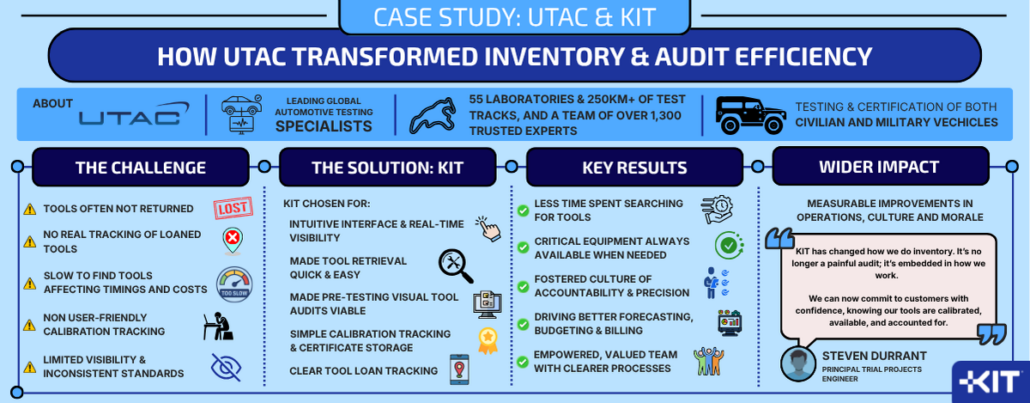
Since 1924, UTAC has led the mobility industry, driving progress toward a safer, cleaner future and offering a wide range of services to support bringing vehicles to market.

3D illustration. Clay car inside wind tunnel. Design without real car reference and without copyright. Concept sports car, industry of transportation.

With a footprint of 55 laboratories and 250km of test tracks across the globe, and a team of over 1,300 trusted experts, UTAC are one of the world’s leading independent experts in automotive testing and engineering. They offer a vast array of tailor-made services for the testing and certification of civilian and military vehicle alike. UTAC operates in a high-pressure environment where precision, speed, and reliability are non-negotiable.

Their work determines whether vehicles are fit for operational duty or use on our roads, so their tools must be flawless.

Challenge

Like many engineering teams, prior to adopting KIT, they faced familiar but costly operational challenges:

  • Tools were not always returned to their designated locations or were out on loan but not consistently tracked.
  • Engineers often took time to locate equipment, potentially affecting project timelines and costs.
  • Calibration tracking was not systematic or user-friendly, so was hard to maintain.
  • Limited visibility and inconsistent standards made cross-departmental collaboration more difficult.

Solution

KIT was introduced as a unified platform for tool and equipment management. Its intuitive user interface allowed engineers to:

  • Locate and grab tools quickly and efficiently.
  • Visually audit tool inventory prior to vehicle testing.
  • Scan tools, check calibration status, certificates and instructions.
  • Track loans and returns across departments.
  • Maintain real-time visibility of inventory status and calibration schedules.

Results

Since adopting KIT, the team has seen measurable improvements across operations, culture, and morale:

  • Operational Efficiency: Engineers now spend less time searching for tools and more time executing tests.
  • Business Continuity: Critical equipment is always available when needed, reducing downtime and ensuring delivery commitments.
  • Cultural Shift: KIT has become embedded in daily workflows, fostering a culture of accountability and precision.
  • Data-Driven Decisions: Real-time insights enable better forecasting, budgeting, and client billing.
  • Morale Boost: Technicians feel empowered and valued, with fewer frustrations and clearer processes.

Customer Quote

“KIT has changed how we do inventory. It’s no longer a painful audit; it’s embedded in how we work. We can now commit to customers with absolute confidence, knowing our tools are calibrated, available, and accounted for.”

Steven Durrant, Principal Trials Project Engineer
UTAC 

UTAC case study UTAC case study
https://thisiskit.com/wp-content/uploads/2026/04/crash-test-2.jpg 576 1024 coplan https://thisiskit.com/wp-content/uploads/2026/02/kit-logo.png coplan2026-05-01 01:37:452026-05-13 14:39:54Transforming tool management at UTAC with KIT

How Probe Manufacturing & Fabrication improved audit readiness, confidence and speed

April 27, 2026/in Case Study, ExploreKit, Tool Audits/by coplan

Client Overview

For nearly 50 years, Probe Manufacturing & Fabrication has been a leading UK based precision engineering company that designs, fabricates, inspects and tests intricate, bespoke components such as flanges, blocks, tees and valves for the UK and European Oil and Gas markets.

Probe have built an enviable track record as experts in their field, combining experienced technicians, extensive certification, an unwavering commitment to project transparency and fast, high-quality turnaround.

Challenge

The company holds multiple certifications and is audited frequently by both customers and technical bodies. Calibration is a key focus during audits, and the team wanted a system that could keep pace with their growing needs and strengthen audit confidence.

The previous system:

  • operated from a single workstation that was also needed for other duties
  • made certificate retrieval slower than ideal and increased the reliance on manual processes
  • created extra burden during audits as staff and auditors had to continually move between the workshop and office

Solution

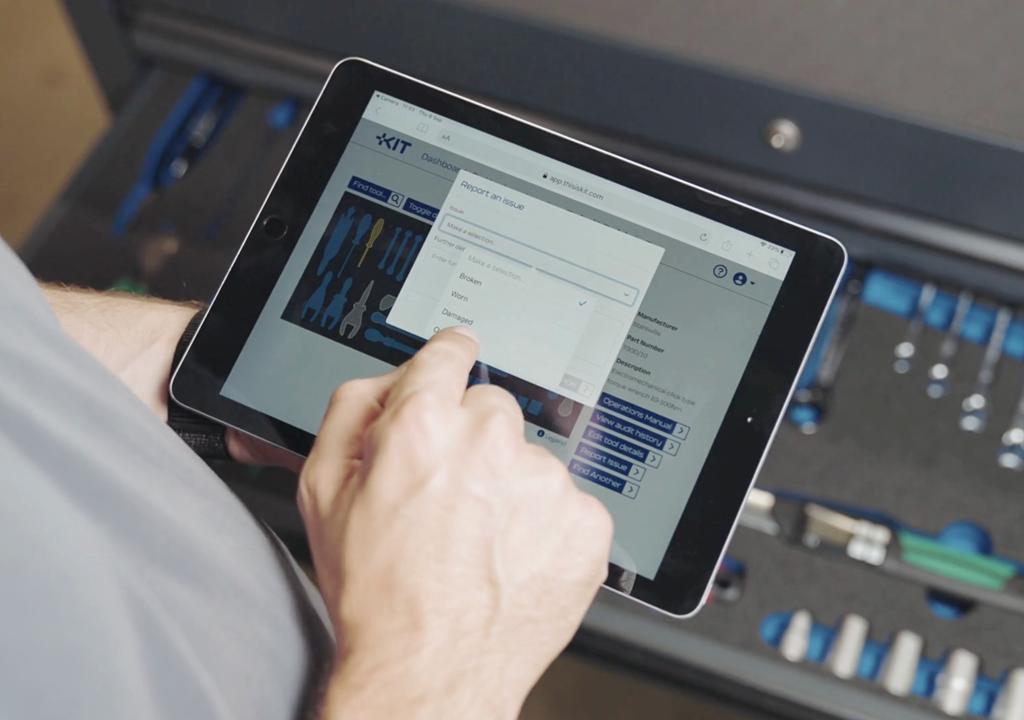
Moving to KIT gave the Probe Quality Control team instant access to calibration data from any device. This removed the constraints of the old single-machine setup and made audits smoother and more transparent.

KIT provided:

  • one click access to certificates and calibration history
  • secure cloud access from any device anywhere on site or remotely
  • fast and intuitive navigation and heightened data visibility
  • a clear dashboard with organised, professional reporting
  • strong onboarding training, ongoing support and regular enhancements from the KIT team
  • the ability for the team to demonstrate complete control over their calibration processes.

Results

The change has been immediate. Probe see clear operational gains as well as stronger audit performance:

  • The system’s simplicity and instant data access reassures auditors that the business has full control, improving auditor confidence
  • The monthly calibration workload has reduced to a tenth of what it was with the old system
  • Reports and certificates are cleaner, easier to read and more consistent
  • Cloud access has eradicated previous delays and data loss concerns

The Probe Quality Control team now have confidence and trust in a system they want to use and new team members have adopted the system quickly and easily.

Customer Quote

“With KIT you can get information anywhere. Before, I was running ragged trying to find certificates. Now I just push a button. Auditors always check calibration areas. For them to see a system that is easy to run gives them confidence straight away.”

“It used to take ages to perform and record calibrations on the old system. Now it takes seconds. It is so much more efficient.”

Kenny Watson, Quality Control Supervisor
Probe Manufacturing & Fabrication

Probe case study Probe case study
https://thisiskit.com/wp-content/uploads/2026/04/pipes.jpg 683 1024 coplan https://thisiskit.com/wp-content/uploads/2026/02/kit-logo.png coplan2026-04-27 15:18:192026-05-29 14:24:16How Probe Manufacturing & Fabrication improved audit readiness, confidence and speed

KIT shortlisted for national award recognising practical process automation

April 22, 2026/in ExploreKit, News, Tool Audits/by coplan

Milton Keynes, Buckinghamshire – As manufacturers continue to look for practical ways to automate compliance-critical processes, Coplan Ltd’s intelligent tool management platform, KIT, has been shortlisted for Most Innovative Solution for Process Automation award at the 2026 Manufacturing Supplier Innovation Awards, run by Manufacturing Today. The shortlist recognises organisations whose solutions offer genuine advancements in automation that increase efficiency, reduce costs, and improve operational accuracy.

KIT transforms manual and inconsistent tool control processes into a centralised, intuitive and always up to date digital system. This helps manufacturers stay compliant, efficient and audit ready.

Through visual dashboards, teams can instantly see their tooling inventory, including missing or broken tools, current location and calibration status.

Over the last twelve months, Coplan has delivered major enhancements to KIT, simplifying calibration workflows and streamlining visual tool audits. This gives manufacturers greater flexibility in how audits are carried out.

Operational teams can tailor the system to local needs, rather than being forced into generic, one-size-fits-all solutions that often create duplication and inefficiency.

Paul Mazaher, Managing Director of Coplan, said: “We’ve designed KIT with our customers to take the pain out of tool control processes, automating everything from audits to calibration to standardisation and procurement, so that nothing falls through the gaps. Just being shortlisted alongside some of the industrial automation giants is a massive win for us and acknowledgement of our efforts. It’s great that there is a public vote and maybe with their help, David can slay Goliath again!”

To Coplan, KIT’s mission is straightforward – making intelligent tool control simple. Because if it’s not simple, it just doesn’t get done. Teams are too busy for complexity and bureaucracy. When a system removes that friction, people feel listened to, adoption improves and teams take greater ownership of their processes.
You can help KIT get the recognition it deserves by taking part in the public vote that closes at 5pm (UK) on 28th April.

https://thisiskit.com/wp-content/uploads/2026/04/newheader.jpg 475 1600 coplan https://thisiskit.com/wp-content/uploads/2026/02/kit-logo.png coplan2026-04-22 14:58:482026-04-30 16:31:20KIT shortlisted for national award recognising practical process automation

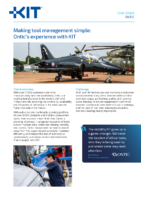
Making tool management simple: Ontic’s experience with KIT

March 18, 2026/in Aerospace, Case Study, Defence, ExploreKit, Tool Audits/by coplan

With over 7,000 customers and nine manufacturing facilities worldwide, Ontic is a leading manufacturer to the world’s civil and military aircraft, ensuring the continuity, availability and longevity of critical parts that keep aircraft flying now and in the future.

With a diverse and continually growing portfolio of over 8,000 products and 1 million component parts, their success meant that Ontic faced a growing challenge: managing thousands of tools across multiple sites, whilst maintaining visibility and control. Ontic recognised the need to move away from the paper-based system to maximise efficiency and reduce the risk of lost tools or unnecessary purchases of non-standard tools. That changed with KIT.

Challenge:

With over 90 technicians and numerous toolboxes across several sites, Ontic wanted better control over tool usage, performing audits, and learning about missing or broken equipment in a timelier manner. Communal tools were difficult to manage, and the lack of real-time data made proactive decision-making nearly impossible.

Solution:

After evaluating several systems, Ontic chose KIT for its simplicity, flexibility, and scalability. The team began with a trial in one area, and thanks to a proactive cell manager, adoption quickly spread. KIT’s intuitive interface, audit tracking, and simple dashboards, reporting and data exports enabled Ontic to gain full control over their tooling estate and enhance efficiency.

Results:

Since rolling out KIT, the impact has been clear:

  • Tool traceability: 95% of toolboxes now digitised and audited via KIT.
  • Reduced costs: Reduction in lost tools and duplicate purchases.
  • Audit performance & ownership: Improved audit compliance and technician accountability.
  • Customer perception: Enhanced customer confidence during site visits.
  • Wider asset management: Used to manage health & safety equipment
    (first aid kits, de-fibs, eye wash stations)


“The visibility KIT gives us is a game-changer. We know the location of all our tools, who they’re being used by and where some may need attention.”

“The simplicity of the system and visibility at all levels ensures issues are resolved quickly, improving efficiency and reducing technicians’ frustration”.

Paul Bates, Production Engineer
Ontic

Ontic Case Study Ontic Case Study
https://thisiskit.com/wp-content/uploads/2026/04/ontic-fe.jpg 1280 1920 coplan https://thisiskit.com/wp-content/uploads/2026/02/kit-logo.png coplan2026-03-18 11:05:202026-05-13 16:32:19Making tool management simple: Ontic’s experience with KIT

Product Update – January 2026

January 26, 2026/in ExploreKit, News, Tool Audits, Tool Inventory Management/by coplan

A major new release for KIT sees huge strides in the versatility of the Audit functionality

The start of 2026 sees a major release for KIT and features a significant update to the Audit functionality. Offering increased flexibility and alternative methods by which you can conduct Audits, and the ability to pause Audits, the new Audit functionality heightens the ability to tailor the solution to your ways of working and work even smarter, rather than harder.

We’re thrilled to introduce these enhancements, which complement rather than replace the existing functionality. They have been designed in collaboration with some of our customers to meet their changing needs as they scale, with clear benefits to the overall workflow and user experience.

Improved Audit Process

We have redesigned the workflow of Audit process, implementing a streamlined, step by step wizard approach. Instead of being asked “Are any spaces at the location empty?” when performing an Audit, we now offer clearer guidance and prompt the User to select all the Items that are missing in the selected Location. Once selected, the wizard restates the Items selected by the User as missing and asks them to confirm to complete the Audit.

Audit By Presence

We have introduced the option for any Audit Policy to be set to either ”audit by presence” or “audit by absence”. The new “audit by presence” capability is a toggle switch that is defined when creating or editing an Audit Policy. The default setting for existing Audit Policies and all new Audit Policies remains “audit by absence”, which is where the user is asked to select all Items that are missing within the Location that is the subject of the Audit.

The “audit by presence” option enables locations to be audited based on what Items are present at the Location rather than what is missing. This is the opposite of the default method but is particularly useful for non-visual locations such as COSHH cupboards or other locations storing various Items such as large power tools, jigs and fixtures. For non-visual Locations, we have also introduced the ability to use cameras or scanners on Item QR or barcode labels to prove their presence. More on that later in these notes.

Audit Pausing

We have created the ability for Audits at a Location to be paused until a defined date in the future, but only by Users with the Pause permission. This feature prevents the Location from being incorrectly included in the Overdue Audit reports whilst the Pause is in place.

Once the Pause has expired, it automatically returns to its normal Audit schedule as determined by the Audit Policy and will be appear in the Overdue Audit report until it is next audited. The concept here is that customers may not want to include some Locations in Audits or reports whilst the Owners of those Locations are on holiday, off sick or seconded elsewhere or if the Location is temporarily out of use.

However, a User with the Pause permission may also manually override the Pause and “Resume Audits” at the Location, so that if they return to work earlier than expected or the Location is reinstated to use earlier, they can ensure the Location audit schedule is restarted.

Permitted Audit Days

Within the definition of an Audit Policy, it is now possible to nominate the days of the week on which Audits would normally occur (“Permitted audit days”) and therefore make it more accurate to determine when Audits become overdue. For example, a location can be marked so that audits only ever become due Monday-Friday. This can help prevent audits becoming overdue when there is no way for the location to be audited on that day.

With this new functionality. the Location will not appear in the Overdue Audits report until the day after which its next Audit falls due. This will make the reporting of Overdue Audits more accurately reflect the normal audit frequency practices of the organisation and eliminate over-counting. It will also reduce the volume of unnecessary notification emails related to Overdue Audits.

Marking Missing Items as Found

Up to now, when an Item is identified and recorded as missing during an Audit and is then subsequently found, the only way to recognise that it is now present at the Location has been to perform a new Audit.

Now, Users can navigate to the Item details and select “Mark as found”. This will record who marked the Item as found with a date/time stamp. This information is available in the Audit History. When an Item is marked as found, the Item is removed from the Missing Items report and will no longer be included in the numbers of Missing Items shown on the Dashboard or included in email notifications.

Expected Missing Items

We have changed the behaviour of KIT regarding Items that are known or expected to be missing. The system will now take into account Loans, Location statuses, and vacant Item pockets in Locations when an audit is performed. Vacant Item pockets no longer need to be selected when reporting missing Items on a visual Location.

If an Item is known to be on an active loan or is known to have a non-default Location status, the system will let the User know that the Item is expected to be missing. These Items will not be shown in the Missing Items report or included in the numbers displayed on the Dashboard. The reason for the absence is maintained in the Audit History.

Audits on Location Groups

Visual audits can now be initiated at Location Group level. This launches a wizard that guides the auditor through all the Audits required for that Location Group in a single session, reducing the number of steps required when compared to the current process of having to perform each Location audit separately. This makes it faster and more efficient to check multiple related locations, such as a cabinet with several drawers.

In this example, if wanting to conduct a complete Audit of a seven-drawer tool cabinet, previously you would have to navigate to each Location individually and then complete the Audit process for each of the seven drawers / Locations. With the new wizard approach, the system does this automatically and prompts you through each Audit. Within the Audit Policy definition, administrators can specify whether it is to be “excluded from group audits”. If this is enabled, any Locations assigned to that policy will be skipped during Location Group Audits.

Reporting of Location Issues

As part of performing a visual Audit, it is now possible to report any issues with the Location itself (e.g. spills/leaks, safety concerns, broken lock, etc). This feature enables the auditor to provide a description of the issues they have seen and attach photos or PDF documents to provide other context as necessary. This new feature is enabled within the Audit Policy definition. Any audits performed on Locations that are subject to an Audit Policy with this enabled is then prompted as part of the Audit wizard to detail any such issues.

In addition, Users who have the new “Audit location issues” email notification enabled within their User record will be sent email notifications whenever a Location issue is recorded. This can be set to notify Users for all Locations or only Locations they own.

Recording remedial actions on Item issues

Now, whenever a User clears an issue on an Item, they are prompted to add notes to detail any remedial action taken to resolve the issue. This gives transparency of any fixes and gives a more complete life history of the Item, such that common issues can be easily spotted over time.

Using cameras & scanners for Audits

When performing an “audit by presence”, a new “Scan items” option is available within the Audit wizard that allows a camera or handheld scanner to be used to scan KIT item tags, QR code labels or barcodes on Items to mark them as present.

The scanner screen provides both visual and audio cues as Items are scanned. This provides a rapid way of verifying the presence of Items in Locations that do not have visual tool control and saves time having to visually search for, find and match each Item to its description in the Item list for that Location.

What’s New

From now on, the first time a user logs in after an update to KIT, they will be greeted by a “What’s New” splash screen that will display the Release Notes for the new release that details the changes to the software that have been implemented since their last login.

This screen will only appear on first login for the user following the update. After that, the Release Notes may still be accessed either on the website or in the new Release Notes archive.

Release Notes archive

We have also implemented an archive of Release Notes that will be available to users via the new Release Notes page. This will contain the Release Notes for up to the 10 most recent releases, so that customers can see a history of when changes were implemented or if they wish to re-read the release notes for the latest release.

Font changes

We have also made subtle tweaks to the default font choices used in the software. We now use “Exo 2” as our font for page, dashboard and report headings and titles, and “Inter” as our default font choice for body content, as featured for data fields and report rows.

Both are free to download Google fonts that render quicker and cleaner, with greater character separation, making them much easier to read on the screen.

We’re always evolving KIT to make managing tools and equipment smarter, simpler, and more insightful.

https://thisiskit.com/wp-content/uploads/2025/10/product-update-fe.jpg 947 1420 coplan https://thisiskit.com/wp-content/uploads/2026/02/kit-logo.png coplan2026-01-26 10:27:342026-04-28 08:30:10Product Update – January 2026

Digital twins in Industry 4.0

December 16, 2025/in Blog, ExploreKit, Tool Calibration/by coplan

How KIT is powering the future of smart manufacturing

Industry 4.0 and digital twins

In the era of Industry 4.0, digital twins are no longer a futuristic concept. They’re a practical, powerful tool reshaping how manufacturers design, monitor, and optimise operations. At KIT, we’re proud to help businesses bridge the physical and digital worlds with precision, control, and clarity.

What is a digital twin?

A digital twin is a virtual replica of a physical asset, system, or process or entire manufacturing site. It uses real-time data and simulation models to mirror the behaviour and performance of its physical counterpart.

In manufacturing, this means you can visualise, analyse, and optimise everything from individual tools to entire production lines, without ever touching the shop floor.

Why digital twins matter in Industry 4.0?

Industry 4.0 is all about connectivity, automation, and data-driven decision-making. Digital twins are central to this vision because they enable:

  • Predictive maintenance – Spot issues before they cause downtime.
  • Process optimisation – Simulate changes and improvements virtually.
  • Enhanced quality control – Monitor tool wear, calibration status, and usage patterns.
  • Faster onboarding and training – Use digital models to train staff without interrupting operations.

How KIT supports digital twin technology?

At KIT, we provide the foundation for digital twins by digitising and organising your physical assets, starting with your tools and equipment. Here’s how:

1. 2D Profiling & visual audits

We create accurate 2D profiles of your tools and equipment, forming the visual basis of your digital twin. These profiles are used to design custom foam inserts that transform tool drawers from chaos to order.

When these layouts are digitised in KIT, your entire tool inventory becomes catalogued, searchable, and visually represented. Tool audits become quick and simple, saving time and improving readiness for every shift.

2. Real-time inventory & calibration data

KIT tracks tool location, availability, condition, and calibration history. This live data feeds into your digital twin, ensuring it reflects the current state of your environment.

Planning a factory floor remodel, production ramp-up, or new project? Your digital twin lets you model and measure effectiveness before making changes.

KIT also automates calibration management and shares real-time status, removing uncertainty about tool readiness and improving safety and compliance.

3. Custom foam inserts & visual control

Custom foam inserts provide the first step toward organisation. When mirrored in KIT’s digital environment, they give teams ownership and accountability.

If tools go missing or break, reporting is instant, there’s no more end-of-shift surprises. Team members can log the issues immediately and this is flagged up in KIT’s dashboard. Managers can act quickly to order replacements, prioritise repairs, or reallocate resources to keep production moving.

4. Driving 5S and integration

KIT supports 5S principles: Sort, Set in Order, Shine, Standardise & Sustain. KIT drives workplace organisation by reducing clutter, freeing space, promoting pride and ownership and standardising tool management.

Integration with ERP systems and reporting tools like Power BI makes KIT a key enabler of smart factory analytics. KIT drives 5S practice forward, removing uncertainty and empowering teams to take control of their environments with pride.

The future: from digital twins to autonomous operations

We’re exploring IoT sensors, machine learning, self-serve onboarding and predictive analytics to make digital twins even smarter. Our goal? For KIT to help manufacturers not just see their operations but understand and improve them in real time.

Ready to build your digital twin?

Whether you’re just starting your Industry 4.0 journey or looking to enhance your existing systems, KIT is here to help.

https://thisiskit.com/wp-content/uploads/2025/12/industry40.jpg 439 1200 coplan https://thisiskit.com/wp-content/uploads/2026/02/kit-logo.png coplan2025-12-16 14:23:042026-05-22 07:45:53Digital twins in Industry 4.0

What to look for in a tool calibration system provider

October 17, 2025/in Blog, ExploreKit, Professional Services & Training, Tool Calibration/by coplan

Choosing the right provider is as much about finding the right partner as the technology.

What to look for in choosing a tool calibration system

When it comes to tool calibration, accuracy is key. Whether you’re in manufacturing, engineering, or quality assurance, the tools you rely on need to be consistently calibrated to avoid errors, downtime, and compliance issues.

But choosing the right calibration system provider can be tricky. It’s not just about features, it’s about finding a solution and a partner that fits how your team works and grows with your needs. Here’s what to look for when evaluating your options.

1. Flexibility in calibration policies

Every organisation has its own standards and workflows. A good calibration system should let you define tool-specific policies that reflect your internal requirements that can change with you, not force you into rigid templates.

KIT, for example, allows users to configure calibration policies per tool, helping teams eliminate ambiguity and ensure every check is done right. This flexibility is especially useful in environments with mixed toolsets or varying compliance needs.

2. Clear audit trails and compliance support

Traceability is key. Look for systems that automatically log calibration events, flag overdue checks, and generate certificates. This makes it easier to stay compliant with standards like ISO 9001 or ISO 45001, and to prove it during audits.

KIT’s clickable calibration histories and automated certificate generation help teams maintain a clear record without the paper chase.

3. Ease of use for technicians and admins

If the system isn’t intuitive, it won’t get used properly. Choose a provider that prioritises user experience with clean interfaces, mobile access, and workflows that make sense for both technicians and managers.

One KIT customer in the aerospace sector shared this:

“KIT gives us complete control over our tool calibration. It’s so simple to use, yet audit-proof, scalable, and built for the complexity of aerospace. “

4. Data centralisation and integration

Tool calibration doesn’t happen in isolation. Your system should align or integrate with asset management, audit, reporting and ERP/procurement platforms to reduce manual data entry and keep everything in sync where relevant.

One-stop solutions like KIT create a place for everything and everything in one place, giving you confidence that your tool data needs are covered.

5. Scalability and support

Think beyond today. Can the system grow with your team? Does the provider offer onboarding help, responsive support, and regular updates? These are crucial when rolling out across multiple sites or departments.

6. Data visibility and reporting

You should be able to see what’s calibrated, what’s due, and what’s out of spec without digging through spreadsheets. Dashboards, alerts, and exportable reports should give you the answers you need to help you stay proactive.

7. Offline and remote capabilities

If your tools are used in the field or in areas with limited connectivity, offline functionality is a must. The system should sync seamlessly when back online, without risking data loss. Equally, if you are operating across a large site with multiple buildings or across multiple locations, the flexibility of being able to access and record data on the move is key.

But don’t just look at the software in isolation as this is more than just a procurement problem, look at the provider too.

Beyond the software: What makes a great calibration system partner

Choosing a calibration system is also about choosing the right people to work with. A true partner brings more than just technology. They bring insight, support, and a shared commitment to your success.

Here’s what to look for in the provider themselves:

1. Responsive, human support

AI agents and chatbots are great when you have a generic question or challenge, but when something goes wrong and you just need a quick answer, you don’t have time to be asking lots of questions of a chatbot and getting caught in a relentless loop. You need answers.

Ready access to a knowledgeable, responsive support team makes all the difference. Look for providers who treat support as a relationship, not a ticketing system and those who invest the time up front to helping your team onboard and embed the solution properly to minimise challenges later down the line.

2. Willingness to challenge and improve

A good partner doesn’t just say “yes”, they ask “why.” They will draw on their knowledge and experience of working with other customers with similar challenges and act as a critical friend, helping customers refine their processes, spot inefficiencies, and challenge assumptions when needed.

3. Industry understanding

Providers who understand your sector can offer more relevant advice and anticipate challenges. Specialist partners can be useful in regulated industries, though they can get stuck in the “we’ve always done it this way” loop.

Partners with a breadth of experience across multiple sectors can often be more open to other ideas, challenging the norm and help customers tailor pragmatic solutions that work in the real world.

It’s about working with people who get your challenges and can come up with simple solutions.

4. Commitment to continuous improvement

The best partners don’t stand still. They will invest in continual evolution of their platform based on customer feedback and emerging technology and industry trends, adding features that solve real problems and improve workflows.

5. Transparent communication

Whether it’s roadmap updates, pricing changes, or feature limitations, transparency builds trust. An open approach to communication helps customers plan confidently and avoid surprises.

Equally, if partners are constantly over-promising and under-delivering, or not being realistic and honest, then they are not a true partner.

Final thoughts

The right calibration system doesn’t just help you stay compliant, it helps you build trust in your tools, your team, and your data.

More importantly, the right system partner does more than offer responsive support. They are also willing to challenge assumptions, offer honest feedback, be honest about issues or concerns and provide alternatives to help you improve. They genuinely care and want to help you succeed and stay ahead of the curve…not just sell to you and move on.

At KIT, we don’t just offer software, we aim to be a true and trusted partner. We’re here to help you get it right, not just get it done.

https://thisiskit.com/wp-content/uploads/2026/03/s3.jpg 430 602 coplan https://thisiskit.com/wp-content/uploads/2026/02/kit-logo.png coplan2025-10-17 16:01:492026-05-21 16:16:50What to look for in a tool calibration system provider

10 tips for developing effective calibration practices

September 15, 2025/in Blog, ExploreKit, Professional Services & Training, Tool Calibration/by coplan

Tool calibration is critical to precision and control in engineering and manufacture, yet it is so often overlooked or avoided.

Calibrating tools sounds straightforward; just follow a process, take some measurements and adjust where necessary to stay within tolerance and record the results.

But people often sidestep it for a mix of practical and psychological reasons. Here’s why:

  • Time constraints: Calibration can be time-consuming without good systems, especially in busy work environments where speed is prized over precision.
  • Overconfidence in accuracy: If a tool seems to be working “well enough,” people assume it’s still accurate, even if it’s drifted over time.
  • Lack of awareness or training: Not everyone knows how or why calibration matters, especially for newer or non-technical users.
  • Inconvenience: Some tools need special equipment or need to be sent off-site to be calibrated, which disrupts workflows.
  • Cost factors: Calibration services or buying the right reference standards can be expensive, especially for smaller operations.
  • Perceived low risk: In contexts where extreme precision isn’t necessary, people might skip calibration, figuring the consequences are minor.

Here’s why it matters:

  • Reliable results: Regular calibration ensures tools perform as expected and avoid costly mistakes or safety risks.
  • Regulatory compliance: Industries like healthcare, aerospace, and manufacturing often require calibration to meet legal standards.
  • Trust & reputation: A mis-calibrated tool can undermine results and damage professional credibility.

People often prioritise speed over certainty, until something goes wrong.

So how do you counter this and tighten up your calibration practices?

Here’s 10 practical tips for making effective calibration a reality:

1. Standardise your calibration procedures

Create clear, step-by-step procedures for each tool type. Use checklists or simple guides to ensure consistency across technicians and shifts.

2. Schedule regular calibration intervals

Set fixed calibration frequencies based on manufacturer recommendations, usage intensity, and criticality. Use calendar reminders or software to automate scheduling.

3. Use consistent reference standards

Always calibrate against traceable, certified standards or industry norms to ensure accuracy and compliance with industry regulations. Being consistent with your approach to calibration of tools over time simplifies compliance and makes it less painful for the technicians doing the calibrations.

4. Maintain a centralised calibration log

Record calibration dates, results, technician names, and any adjustments made. Digital calibration management systems are ideal for easy access and audits and give that confidence that checks are being done and issues captured.

5. Train staff thoroughly and highlight best practice

Ensure everyone involved understands the importance of calibration, their responsibilities and how to perform it correctly. Include calibration in onboarding and refresher training and celebrate good practice within the team.

6. Use calibration management software

Automate reminders, documentation, and reporting with software tools. This reduces human error and improves traceability.

7. Clean and inspect tools before calibration

Dirt, wear, or damage can affect readings. Always inspect and clean tools before calibrating to ensure reliable results.

8. Calibrate in a controlled environment

Temperature, humidity, and vibration can affect calibration. Use a stable, controlled environment to minimise external influences.

9. Monitor calibration drift

Track how much tools deviate over time. This helps predict when recalibration is needed and may indicate tool reliability, wear or failure. Centralising the calibration history of your tools gives you that at a glance knowledge of potential problems.

10. Flag and isolate out-of-tolerance tools

Immediately tag and remove any tools that fail calibration to prevent inaccurate measurements or compromised quality. Respond early to flagged and recurring issues to reinforce importance. Engage team in refining procedures and tool design or selection / testing of alternatives.

Calibrating tools and instruments doesn’t have to be a tedious chore. By blending smart automation, streamlined workflows, and clear accountability, you can turn calibration from a dreaded task into a seamless part of your routine. But whatever you do, use the KISS principle and make it as easy as possible as team buy-in and adoption is so crucial to effective calibration.

https://thisiskit.com/wp-content/uploads/2026/03/10-tips-calibration.jpg 1280 1920 coplan https://thisiskit.com/wp-content/uploads/2026/02/kit-logo.png coplan2025-09-15 14:17:582026-05-28 13:18:5210 tips for developing effective calibration practices

Pages

  • Aerospace
  • Automotive
  • Blog
  • Careers
  • Case Studies
  • Contact Us
  • Coplancontrol
  • COSHH & Safety
  • Defence
  • Events
  • Explore Kit
  • Foam Inlays (Drawers & Cases)
  • Food & Drink
  • History
  • News
  • Our Standards & Approach
  • Partners & Memberships
  • Privacy Policy
  • Professional Services
  • Protection Foams
  • Resources
  • Shadow Boards (Foam & Vinyl)
  • Terms & Conditions
  • Terms of Access
  • Terms of Use
  • Tool Audits
  • Tool Calibration
  • Tool Inventory Management
  • Tool Standardisation
  • Welcome

Categories

  • Aerospace
  • Automotive
  • Blog
  • Case Study
  • COSHH & Safety
  • Defence
  • Event
  • ExploreKit
  • Foam Inlays
  • News
  • Professional Services & Training
  • Shadow Boards
  • Tool Audits
  • Tool Calibration
  • Tool Inventory Management
  • Tool Standardisation

Archive

  • May 2026
  • April 2026
  • March 2026
  • January 2026
  • December 2025
  • November 2025
  • October 2025
  • September 2025
  • March 2025
  • February 2025
  • May 2024
  • February 2024
  • January 2024
  • November 2023
  • July 2023
  • May 2023
  • April 2023
  • March 2023
  • July 2022
  • January 2022
  • July 2021
  • May 2021

Take Your Next Step

Click a button below to move one step closer to realising how KIT can simplify your tool management

Read more about KIT Watch Demo Request Info Schedule a Call

KIT® is a registered trademark of Coplan Ltd

Location Location Coplan Ltd, 28 Vincent Avenue, Crownhill, Milton Keynes, MK8 0AB

Phone Phone +44 (0)1908 307956

Mail Mail info@coplancontrol.com

General

Home
Careers
History
Our Standards & Approach
Partners & Memberships
Resources

News & Views

Blog
Case Studies
Events
News

Products

ExploreKIT
COSHH & Safety
Tool Audits
Tool Calibration
Tool Inventory Management
Tool Standardisation
Professional Services & Training
Explore COPLAN Foams
Protection Foams
Foam Inlays
Shadow Boards

Industries

Aerospace
Automotive
Defence
Food & Drink

Contact Us

General
Book a Discovery Call

KIT® is a registered trademark of Coplan Ltd

Location Location Coplan Ltd, 28 Vincent Avenue, Crownhill, Milton Keynes, MK8 0AB

Phone Phone +44 (0)1908 307956

Mail Mail info@coplancontrol.com

General

Home
Careers
History
Our Standards & Approach
Partners & Memberships
Resources

News & Views

Blog
Case Studies
Events
News

Products

ExploreKIT
COSHH & Safety
Tool Audits
Tool Calibration
Tool Inventory Management
Tool Standardisation
Professional Services & Training
Explore COPLAN Foams
Protection Foams
Foam Inlays
Shadow Boards

Industries

Aerospace
Automotive
Defence
Food & Drink

Contact Us

General
Book a Discovery Call

©2026 KIT is a trading style of Coplan Limited
  • Link to Instagram
  • Link to LinkedIn
  • Link to Youtube
  • Terms & Conditions
  • Privacy Policy
  • Terms of Use
  • Terms of Access
Scroll to top Scroll to top Scroll to top
  • Home
  • Products
    • KIT
    • Explore KIT
    • COSHH & Safety
    • Tool Audits
    • Clear Title
    • Tool Calibration
    • Tool Inventory Management
    • Tool Standardisation
    • Other Products & Services
    • Protection Foams
    • Foam Inlays (Drawers & Cases)
    • Shadow Boards (Foam & Vinyl)
    • Professional Services & Training
  • Industries
    • Aerospace
    • Automotive
    • Defence
    • Food & Drink
  • Case Studies
  • News & Events
    • Blog
    • News
    • Events
  • About Us
    • Careers
    • History
    • Our Standards & Approach
    • Partners & Memberships
  • Contact Us